

A Virtual Private Server (VPS) sits between shared hosting and dedicated servers, offering isolated resources on a shared physical machine. It’s popular with startups, SaaS teams, developers, and growing businesses because it provides root access, predictable performance, and scalable pricing. Yet VPS costs vary widely—from budget plans at $4–$10/month to premium managed offerings above $60/month—depending on resources, location, support, and service extras. This article breaks down every major pricing factor, exposes hidden fees, and provides pragmatic strategies to optimize your spend without compromising reliability.
📌 IMPORTANT: VPS pricing is not just CPU/RAM. Total cost often doubles when you add managed support, backups, premium bandwidth, Windows licensing, and control panels. Always compare “effective monthly cost,” not just base plan price.
VPS pricing fundamentals
Core resources and their impact on price
The biggest determinant of VPS price is your resource package—CPU cores (shared or dedicated), RAM, storage type and capacity, and bandwidth. Providers typically price plans proportionally to resource tiers, but differences in virtualization, storage performance, and network quality lead to meaningful variation. Understanding whether CPU is burstable vs dedicated and whether storage is SSD/NVMe vs HDD is critical to aligning cost with actual performance.
- CPU: Shared/burstable vCPUs are cheaper; dedicated cores cost more but provide consistent performance.
- RAM: Memory-heavy workloads (databases, JVM apps) require 4–16 GB+; RAM increases often trigger the largest price jumps.
- Storage: NVMe SSDs deliver high IOPS and low latency; HDD is cheaper but bottlenecks databases and APIs.
- Bandwidth: Plans include 1–10 TB/month; unmetered ports usually have lower speeds or fair-use throttling.
| Tier | CPU type | vCPU cores | RAM (GB) | Storage (GB) | Storage type | Bandwidth (TB) | Price (USD/month) |
|---|---|---|---|---|---|---|---|
| Entry | Burstable | 1 | 1–2 | 20–40 | SSD | 1 | $4–$8 |
| Developer | Burstable | 2 | 4 | 60–80 | SSD/NVMe | 2 | $8–$15 |
| Business | Dedicated | 4 | 8–16 | 120–200 | NVMe | 3–5 | $18–$40 |
| High I/O | Dedicated | 4–8 | 16–32 | 200–400 | NVMe RAID | 5–10 | $40–$80+ |
✅ USEFUL: If your workload is CPU-light but I/O-heavy (e.g., small DB with frequent reads), prioritize NVMe storage and moderate RAM over extra cores to prevent spending on unused CPU.
Virtualization type and overhead
Providers use different virtualization technologies—KVM/QEMU for full virtualization or LXC/OpenVZ for containers. Full virtualization provides stronger isolation and compatibility (e.g., custom kernels), often with higher resource overhead and slightly higher pricing. Container-based solutions can be cheaper and faster to deploy but may impose limitations on kernel-level control and certain modules.
- KVM/QEMU: Best for isolation, custom kernels, Windows VPS; typically higher price due to licensing and overhead.
- LXC/OpenVZ: Efficient resource sharing; lower cost; limited kernel control; ideal for lightweight Linux services.
Management level, support, and SLAs
Managed vs unmanaged VPS
Unmanaged VPS is cheaper but leaves system administration to you—security patching, monitoring, backups, and troubleshooting. Managed VPS adds proactive monitoring, patching, incident response, and configuration help, which can significantly increase monthly costs. Evaluate your team’s expertise and the cost of downtime before deciding.
| Service type | Typical surcharge | Included tasks | Best for |
|---|---|---|---|
| Unmanaged | $0 | Root access only, basic hardware uptime | Developers, hobby projects |
| Semi-managed | $5–$20 | Basic monitoring, occasional assistance | Small teams, stable apps |
| Fully managed | $20–$60+ | 24/7 support, patching, optimization | Businesses without DevOps |
💡 TIP: If response times matter, ask for guaranteed support SLAs with penalties (credits) for missed response or resolution times—this is separate from uptime SLAs and changes the real cost-benefit.
Uptime SLAs and real-world reliability
Most providers advertise 99.9%–99.99% uptime. The difference is substantial: 99.9% allows ~43 minutes of downtime per month; 99.99% allows ~4 minutes. Providers that deliver higher uptime often charge more, particularly when paired with transparent incident reporting and multi-AZ redundancy. Always check SLA fine print for maintenance exclusions and credit mechanisms.
| Uptime SLA | Max downtime/month | Typical price impact |
|---|---|---|
| 99.9% | ~43 min | Low |
| 99.95% | ~22 min | Moderate |
| 99.99% | ~4 min | Higher |
📌 IMPORTANT: SLA credits rarely cover business losses. Consider redundancy (active-active or warm standby) as an operational cost, not an optional add-on.
Software licensing and add-ons
Operating system and control panels
Linux distributions are free (or low-cost for enterprise variants), while Windows Server requires licensing, adding $5–$25/month depending on provider and edition. Control panels like cPanel and Plesk add convenience for website hosting but increase monthly costs. Evaluate whether you truly need a panel or if provisioning tools (Ansible, Docker) and a minimal stack meet your needs.
| Item | Typical monthly cost | Notes |
|---|---|---|
| Linux (Ubuntu/Debian) | $0 | Community support |
| Windows Server | $5–$25 | Licensing via provider |
| cPanel Admin | $15–$20 | Website hosting ease |
| Plesk Web Admin | $10–$15 | Alternative panel |
Backups, snapshots, and disaster recovery
Backups are sometimes optional but almost always recommended. Pricing models vary: per-GB storage, per-snapshot, or flat monthly fees. Frequent snapshots improve RPO (Recovery Point Objective) but can increase storage costs dramatically for large volumes. Consider incremental backups and offsite storage to optimize cost.
| Backup type | Cost model | Typical cost | Use case |
|---|---|---|---|
| Provider snapshots | Per GB/month | $0.02–$0.05/GB | Fast rollbacks |
| Managed backups | Flat + per GB | $5–$15 + storage | Turnkey DR |
| Offsite object storage | Per GB/month | $0.015–$0.03/GB | Resilience |
💡 TIP: Use incremental backups with retention policies (e.g., 7 daily, 4 weekly, 3 monthly) to balance recovery needs and storage costs.
Network, bandwidth, and IP costs
Bandwidth models and overage
VPS bandwidth can be sold as a monthly quota (1–10 TB) or as “unmetered” on capped ports (e.g., 100–200 Mbps). Overage fees per TB often apply if you exceed quotas. High-quality networks with better peering (Tier 1, regional IX) and DDoS protection can carry higher prices but materially reduce latency and packet loss for your users.
| Bandwidth plan | Model | Quota/Speed | Overage | Price impact |
|---|---|---|---|---|
| Metered | TB/month | 2–5 TB | $5–$15/TB | Lower base price |
| Unmetered | Port speed | 100–200 Mbps | None | Higher base price |
| Premium network | TB/month | 3–10 TB | $10–$25/TB | Higher reliability |
IPv4/IPv6 addressing
IPv6 is free with most providers; IPv4 scarcity leads to monthly charges per IP address. Additional IPv4s for SSL isolation, mail servers, or custom routing can add notable recurring costs. Some providers restrict bulk IP allocation to prevent abuse.
| Address type | Typical monthly cost | Notes |
|---|---|---|
| IPv6 | $0 | Usually included |
| IPv4 (first) | Included | 1 address with plan |
| IPv4 (extra) | $1–$5/IP | Scarcity pricing |
📌 IMPORTANT: Mail deliverability is not guaranteed by simply adding a dedicated IPv4. You may need proper DKIM/SPF/DMARC, reverse DNS, and a clean IP reputation—factor time and expertise into “true cost.”
Location, compliance, and performance
Data center region and latency
Pricing often varies by region. North America and parts of Europe typically offer competitive rates; Asia-Pacific and niche regions can be more expensive due to infrastructure and bandwidth costs. Select a location near your users for better latency and consider multi-region setups for global applications.
| Region | Relative price | Latency to local users | Typical use case |
|---|---|---|---|
| North America | Low–Medium | Low | US/Canada audiences |
| Western Europe | Low–Medium | Low | EU/UK audiences |
| Eastern Europe | Medium | Low–Medium | Regional services |
| Asia-Pacific | Medium–High | Low locally | APAC audiences |
Compliance and certifications
If your application must meet regulatory requirements (GDPR, HIPAA, PCI DSS), providers with documented compliance and audited controls may charge more. The premium pays for security tooling, audits, and operational rigor. For sensitive workloads, this “compliance tax” can be a worthwhile trade-off versus self-managing controls on a cheaper plan.
💡 TIP: Ask for data processing agreements (DPA), audit reports, and clear breach notification policies—these documents often reveal hidden obligations and risk that affect your total cost of ownership.
Billing models, discounts, and hidden costs
Monthly vs hourly billing
Most VPS plans are monthly, though some providers offer hourly billing with caps. Hourly is useful for short-lived environments (testing, CI), but watch for minimum charges. Standard monthly contracts may include discounts for long-term commitments (quarterly, annual) and prepayment.
| Billing model | Flexibility | Typical discount | Best for |
|---|---|---|---|
| Hourly | High | None | Ephemeral workloads |
| Monthly | Medium | 0–10% | General use |
| Annual | Low | 5–20% | Stable workloads |
Promotions and “effective cost”
Introductory offers reduce the first-term price, but renewal rates can jump. Calculate effective monthly cost over 12 months including add-ons. Beware “free” trials tied to paid add-ons (control panel, backups) that silently convert at renewal.
- Effective cost: (Base price + add-ons + IPs + backups + panel + overage) ÷ months.
- Renewal delta: Track price differences between promo and standard rates.
📌 IMPORTANT: Some providers throttle I/O or network after “fair use” thresholds even on unmetered plans. Ask explicitly about IOPS caps, CPU steal time, and bandwidth shaping.
Realistic scenario planning
Matching workloads to tiers
Choosing a plan is about aligning workload characteristics with resources. For static websites, CPU/RAM demands are minimal; for APIs and databases, prioritize RAM and I/O; for data pipelines, consider dedicated CPU and high bandwidth. Use objective metrics (RPS, latency, memory usage, disk IOPS) to avoid overpaying.
| Workload | Recommended vCPU | RAM | Storage | Network | Estimated monthly cost |
|---|---|---|---|---|---|
| Static site + small CMS | 1–2 (burstable) | 1–2 GB | 20–40 GB SSD | 1–2 TB | $5–$10 |
| API + small DB | 2 (burstable/dedicated) | 4–8 GB | 60–120 GB NVMe | 2–3 TB | $12–$25 |
| Medium e-commerce | 4 (dedicated) | 8–16 GB | 160–240 GB NVMe | 3–5 TB | $25–$45 |
| Data processing | 4–8 (dedicated) | 16–32 GB | 240–400 GB NVMe | 5–10 TB | $45–$90 |
✅ USEFUL: For seasonal traffic spikes, use a smaller baseline VPS and scale horizontally with a temporary extra node. This often beats paying for a large plan year-round.
Cost optimization checklist
Systematic cost optimization starts with measuring resource usage and right-sizing. Track CPU load, memory footprints, disk I/O, and egress bandwidth. Enable caching and tune databases to reduce storage thrash; move heavy assets to object storage/CDN; and consolidate low-traffic services onto one instance where safe.
- Right-size: Review usage monthly; downscale if peak-to-average ratio is low.
- Cache: Use Redis/Nginx caching to cut CPU and disk hits.
- IO optimization: Tune file systems, use proper DB indices.
- Separate concerns: Offload static assets to CDN and backups to object storage.
💡 TIP: NVMe storage often yields bigger performance gains than adding CPU cores for database-heavy apps—spend where it moves the needle.
Security, DDoS protection, and maintenance
Security add-ons
Security features impact both cost and risk posture. Basic firewalls are usually included; advanced WAFs, malware scanning, and DDoS mitigation are add-ons. Some providers bundle 20–100 Gbps DDoS protection; higher-tier protection is priced separately. Consider managed patching and configuration hardening if your team lacks security expertise.
| Security feature | Typical cost | Benefit |
|---|---|---|
| Basic firewall | Included | Ingress/Egress rules |
| DDoS protection (standard) | Included–$10 | Baseline mitigation |
| DDoS protection (advanced) | $15–$50+ | Higher bandwidth attacks |
| WAF | $10–$30 | App-layer protection |
📌 IMPORTANT: Cheap VPS plans may share noisy neighbors causing CPU steal time or I/O contention. If latency unpredictability hurts your business, upgrade to dedicated cores or a provider with strict resource isolation.
Total cost of ownership (TCO)
Beyond the monthly price
True VPS cost includes infrastructure, operations, and risk management. Add the price of monitoring, alerting, logging (and their storage), developer time for maintenance, incident handling, and compliance. A slightly more expensive managed plan can be cheaper in TCO if it prevents outages and reduces engineering overhead.
| Cost component | Example monthly | Notes |
|---|---|---|
| Base VPS | $12–$25 | Mid-tier plan |
| Backups | $5–$15 + storage | Depends on retention |
| Control panel | $10–$20 | Optional |
| Extra IPv4 | $1–$5 | Per address |
| Monitoring/logging | $5–$25 | Per service/tool |
| Managed support | $20–$60+ | Optional |
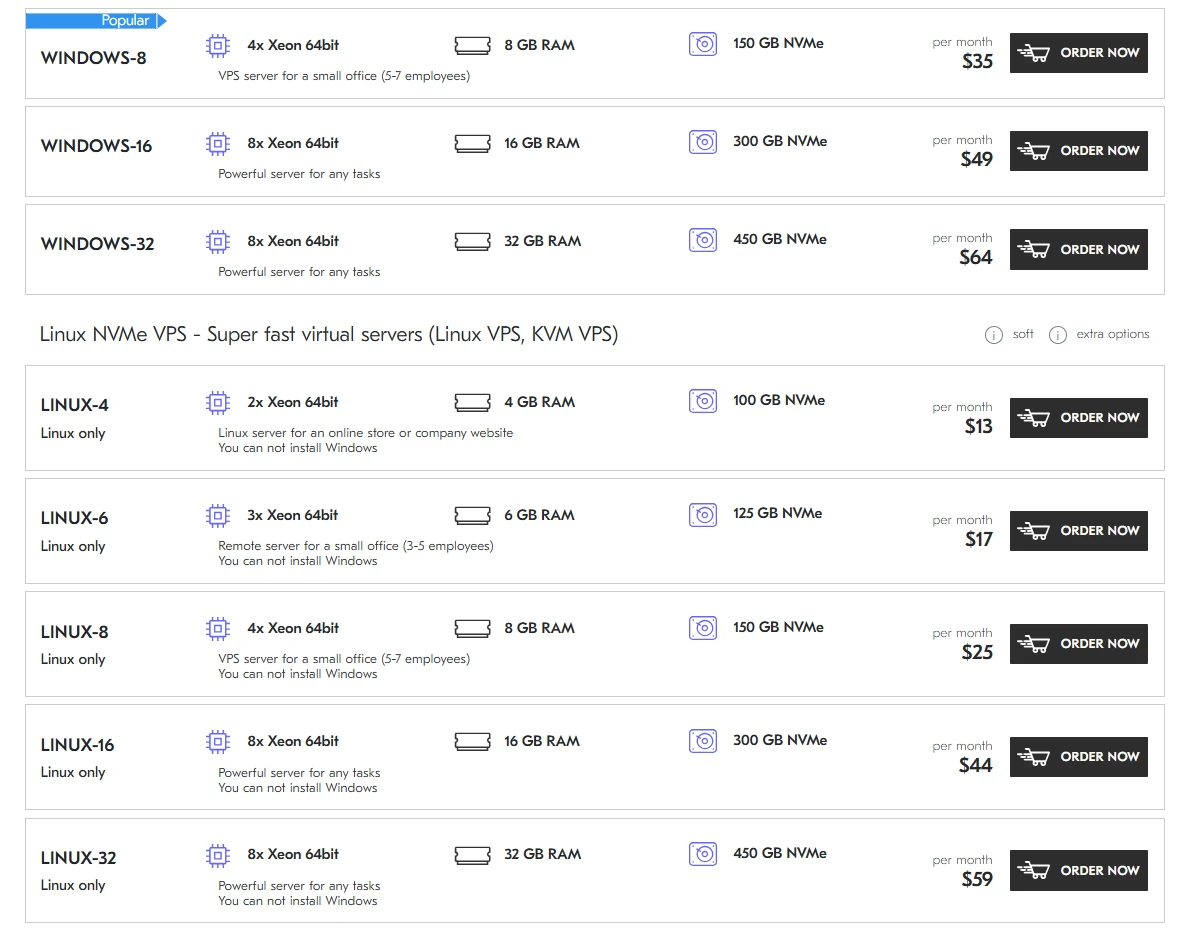
✅ USEFUL: If your team spends more than 2–4 hours/month on routine VPS maintenance, a semi-managed or managed plan often pays for itself in reduced labor and fewer incidents.
Negotiation and provider selection
What to ask before you buy
Due diligence helps avoid gotchas. Ask providers about CPU allocation (dedicated vs shared), IOPS limits, network peering, backup pricing, SLA remedies, renewal rates, and abuse policies. Request benchmark numbers (fio/iperf) or trial periods to validate performance claims. Favor transparent billing and clear policies.
- CPU details: Are cores dedicated? What’s the vCPU-to-physical ratio?
- Storage caps: Any IOPS or throughput limits? How are noisy neighbors handled?
- Network: Peering partners, IX presence, typical latency to your region.
- SLA credits: How are they applied? Any exclusions?
- Renewals: How do promo rates change?
💡 TIP: Compare at least three providers with identical specs. If one is significantly cheaper, read the fine print on throttling, overage, and support scope to ensure the savings aren’t illusory.
Quick reference pricing map
Typical monthly ranges by scenario
While exact pricing varies, most common scenarios fall within the ranges below. Use these as a starting point, then refine based on your performance metrics and add-ons.
| Scenario | Unmanaged | Managed | Notes |
|---|---|---|---|
| Personal site/blog | $4–$8 | $15–$30 | Light resources |
| Startup API | $10–$20 | $25–$50 | IO-sensitive |
| SMB e-commerce | $20–$40 | $40–$80 | Higher uptime |
| Data processing | $40–$80 | $70–$120 | CPU/bandwidth heavy |
📌 IMPORTANT: Don’t chase the lowest sticker price. A $12 plan with reliable NVMe, clear SLAs, and honest support can outperform a $8 plan that silently throttles under load.
Final thoughts
VPS pricing is a composite of resources, virtualization, storage performance, network quality, location, support, software licensing, and security. The “right” price is the one that matches your workload with consistent performance and realistic risk coverage. Start by measuring your app, right-size the instance, prioritize NVMe and isolation for I/O-sensitive workloads, adopt disciplined backups, and clarify SLAs. Then, compare effective monthly costs including add-ons and renewal rates. With these steps, you’ll avoid overpriced plans and underpowered servers—anchoring your stack on a VPS that’s fast, resilient, and fairly priced.
✅ USEFUL: For most modern web apps, the sweet spot is 2 vCPU, 4–8 GB RAM, NVMe storage, and 2–3 TB bandwidth at $12–$25/month—then add backups and minimal managed support if uptime is business-critical – https://deltahost.com/windows-6.html.
💡 TIP: Revisit your plan quarterly. Traffic and usage patterns evolve; your VPS should too. Proactive right-sizing is the simplest way to keep performance high and costs sane.