
)
You enter a match and everything feels perfect—until it suddenly doesn’t. Attacks fail to register, opponents’ abilities activate seconds late, and actions feel sluggish. Disconnections happen one after another, rankings drop, and your ISP offers no real help. Or maybe you’re streaming, and your viewers complain about stuttering video and artifacts. This is a familiar nightmare for gamers. Losing not because of poor gameplay, but because the network let you down.
Core Network Issues Gamers Encounter
Connection problems ruin immersion, slow down improvement, increase the chance of losing crucial games, and complicate streaming or communicating with viewers. Tracking down the root cause and dealing with technical support consumes time, energy, and patience.
High Ping (Latency)
Ping represents the delay between a player’s input and the server’s response, measured in milliseconds. In competitive gaming, even a 20–50 ms difference can determine who wins a duel. High latency appears as delayed reactions, shots that don’t register, and sluggish character movement. Standard benchmarks are well known: up to 50 ms — excellent, 50–100 ms — tolerable, and anything above 150 ms — a serious disadvantage in competitive play. High ping is usually caused by long distances to servers, inefficient ISP routing, or overloaded network nodes.
Lag, Jitter, and Packet Loss
These issues undermine control stability even when average ping looks acceptable.
- Lag causes freezes and interruptions during gameplay.
- Jitter refers to unstable latency with constant fluctuations.
- Packet loss happens when data fails to reach the server and must be resent.
Typical reasons include weak Wi-Fi signals, low-quality routers, network congestion at home, signal interference, or instability within ISP infrastructure or backbone networks.
DDoS Attacks
DDoS attacks involve flooding a player’s IP address or a server with massive traffic or specially crafted packets to overwhelm the connection and disrupt gameplay. This threat is particularly serious for esports players, streamers, and those active in public matches. Such attacks can remove players from tournaments, interrupt broadcasts, and cause ranking losses.
Common indicators of a DDoS attack include sudden and persistent disconnects, ping spikes reaching thousands of milliseconds, inability to connect to voice services, and unusually high inbound traffic shown on the router.
Why Connection Stability Matters So Much for Gamers
A stable connection defines how responsive and predictable gameplay feels. In competitive matches, every delay or dropped packet can cost a victory: hits are registered based on packet arrival at the server, not what you see on screen. When latency is high or unstable, jitter is strong, or packets are lost, controls become erratic—characters rubber-band, shots miss, and voice chat cuts out. For streamers and teams, this also means reputational and organizational losses: broken streams, tournament penalties, and rating declines.
What Proxies Are and How They Improve Gaming Connections
Proxies act as intermediary servers that route traffic between a player’s device and the game server. Instead of connecting directly, the game client sends data to the proxy, which then forwards it to the destination.
From a gamer’s perspective, this provides several advantages:
- Route optimization. Many ISPs use inefficient default paths to game servers. A proxy with strong connectivity can select a shorter or cleaner route, reducing hop count, latency, and jitter.
- Lower jitter and packet loss. Stable proxy channels and optimized routing help maintain consistent bandwidth, minimizing latency spikes and dropped packets.
- Support for required protocols. Most modern games rely on UDP. Regular HTTP proxies are ineffective here, while SOCKS5 or specialized gaming proxies and VPNs support UDP traffic and meet low-level networking requirements.
How Proxies Can Reduce Ping
Quality proxy providers often maintain superior peering agreements and optimized routes to gaming data centers. When a proxy has a direct, high-speed connection to the game’s hosting infrastructure, traffic passes through fewer intermediate nodes, reducing overall latency.
DDoS Protection Through Proxies
Proxies offer an initial layer of DDoS defense by masking the real public IP address of the player or server. Incoming traffic targets the proxy’s IP instead, where malicious packets can be filtered or scrubbed at the provider level before they ever reach the end user.
Situations Where Proxies Are Especially Effective
Online Games With Distant Servers
When players are geographically far from game data centers, ISP routing often involves many transit points, increasing ping and instability. In these cases, a high-quality gaming proxy with an exit node closer to the server and strong peering can significantly improve performance.
Esports Professionals
Competitive play requires consistently low latency, stable packet delivery, and rapid response to network incidents. Professional teams benefit from paid solutions that offer guaranteed bandwidth, SLAs, and the ability to select specific routes or dedicated exit nodes.
Streamers at Risk of Attacks
Streamers are frequent DDoS targets aiming to disrupt broadcasts. Proxies reroute traffic through protected infrastructure where filtering and mitigation tools are available. For streaming, solutions with built-in network-level DDoS protection and fast exit-node switching are ideal.
How to Configure a Proxy for Gaming
Common Connection Methods
Windows: Automatic Configuration
This is the easiest method and works for most users. Specialized tools can automatically scan the network and apply proxy settings. However, this approach isn’t always precise and may occasionally configure incorrect parameters.
Steps:
Click the “Start” button in the lower-left corner of the screen.
Select “Settings” from the menu.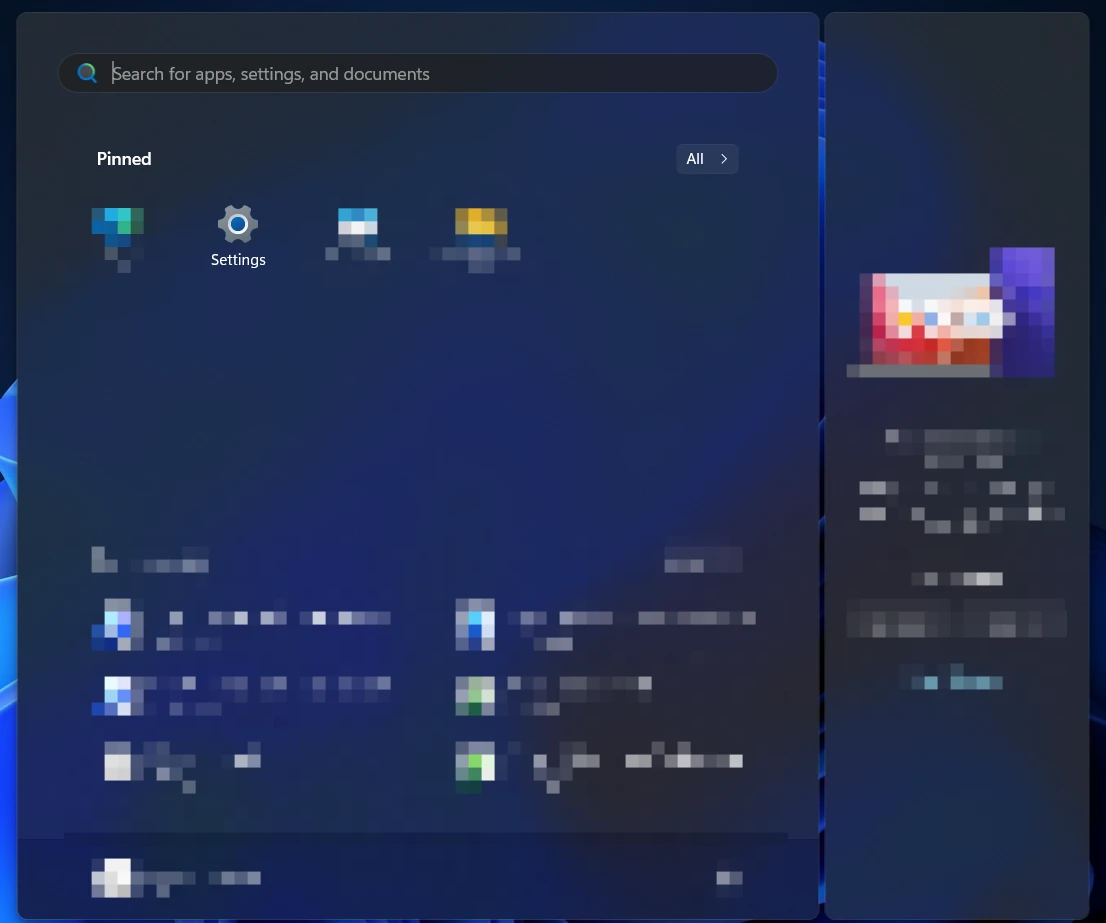
Open “Network & Internet.”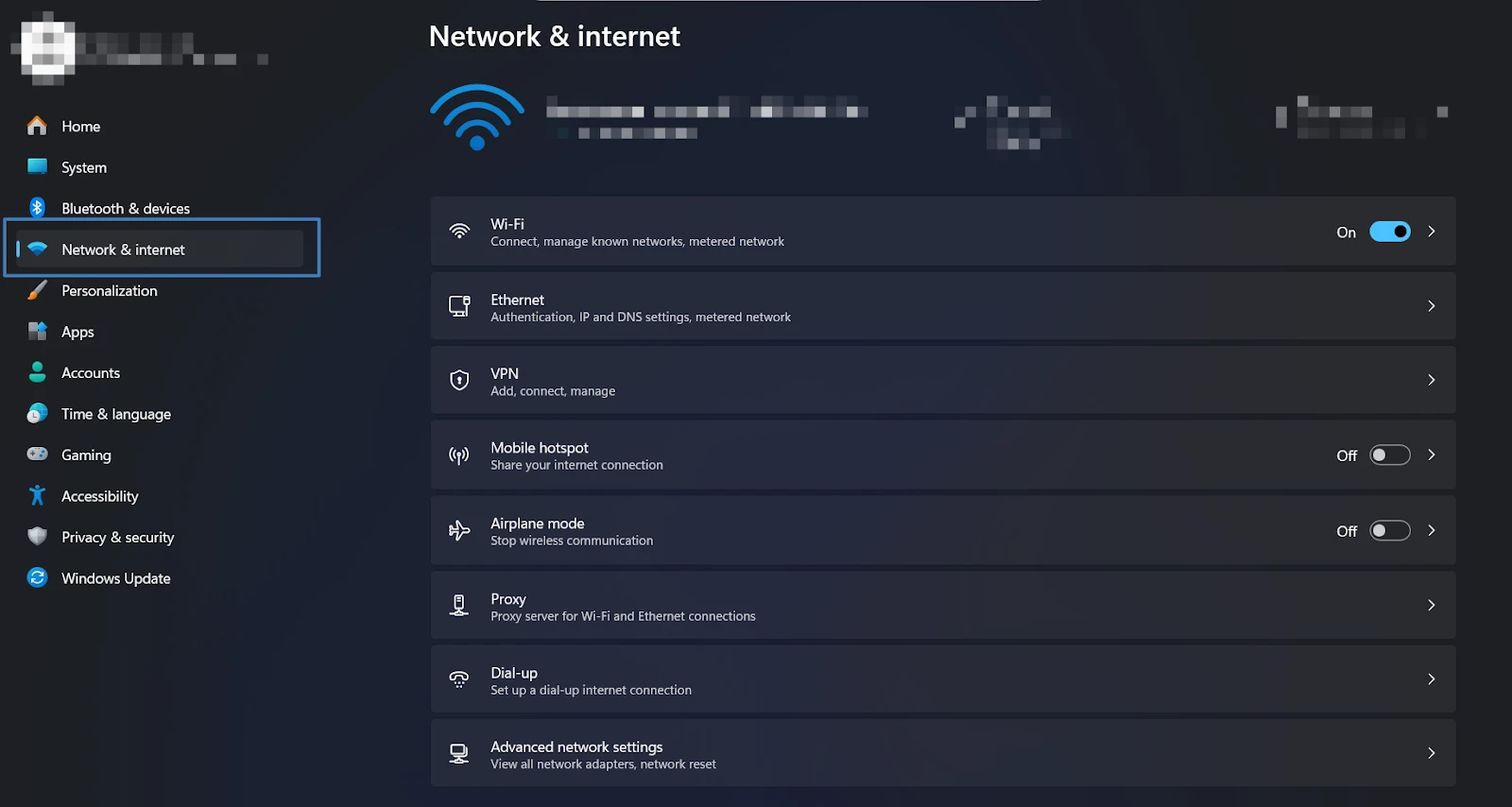
Click “Proxy.”
Enable “Automatically detect settings.”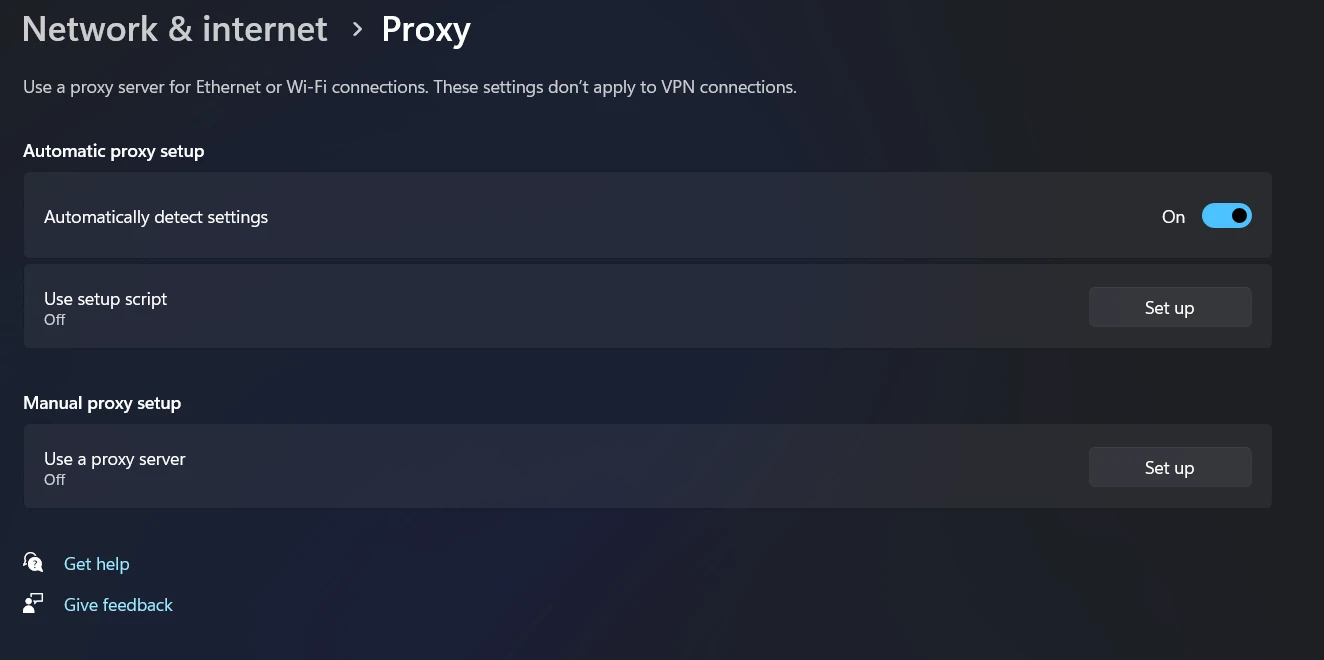
Once enabled, Windows will attempt to locate and configure a proxy server automatically.
Manual Configuration
For users who want full control, manual setup is the better option. In Windows 11, open Settings → Network & Internet → Proxy, then enter the proxy’s IP address and port manually.
Steps:
Click the “Start” button in the lower-left corner.
Select “Settings.”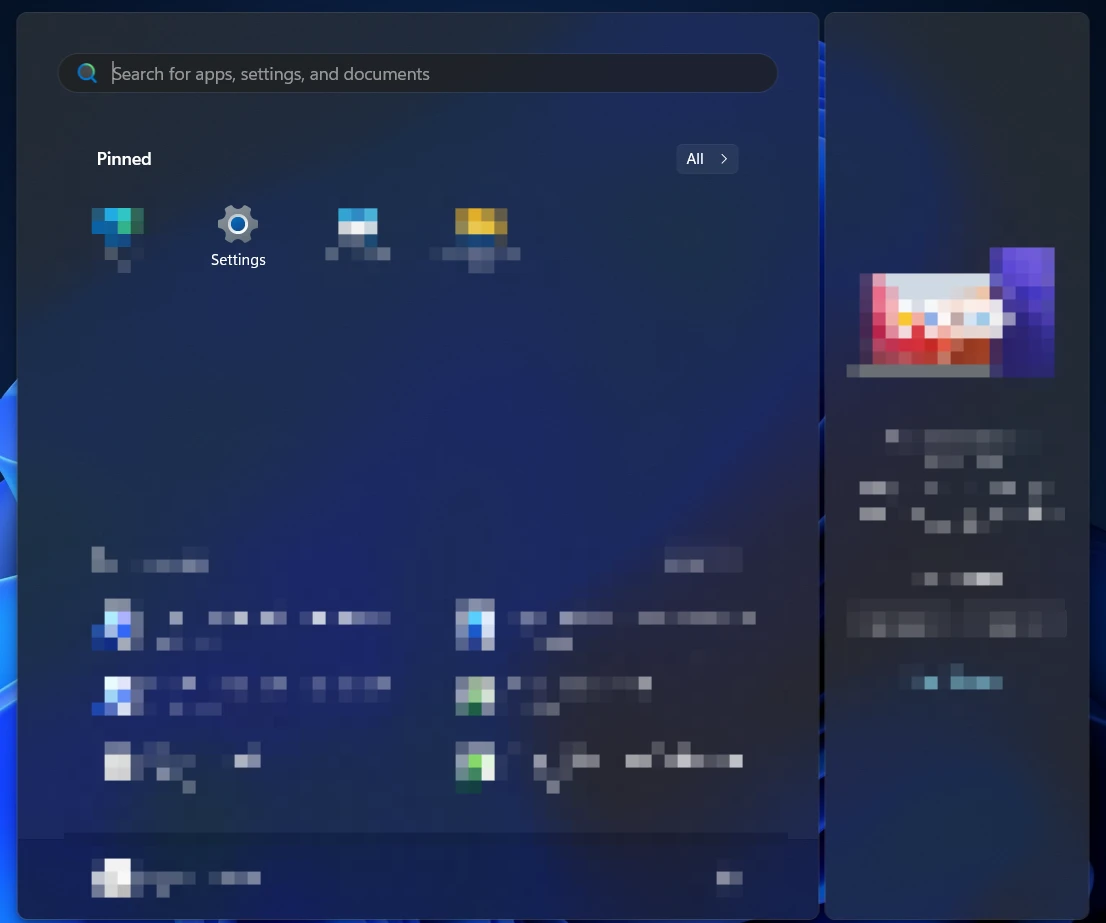
Open “Network & Internet.”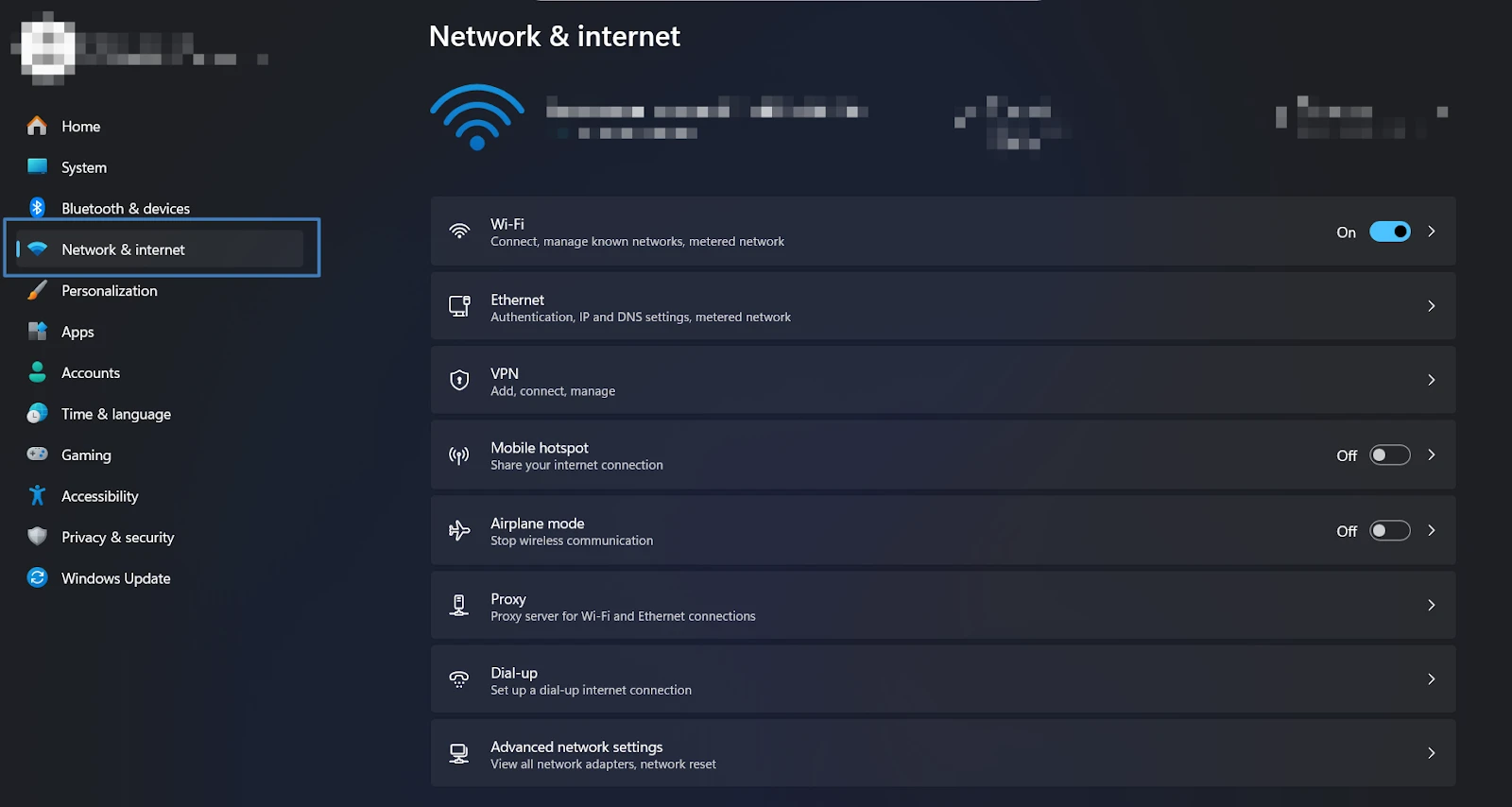
Click “Proxy.”
Under “Manual proxy setup,” click “Set up.”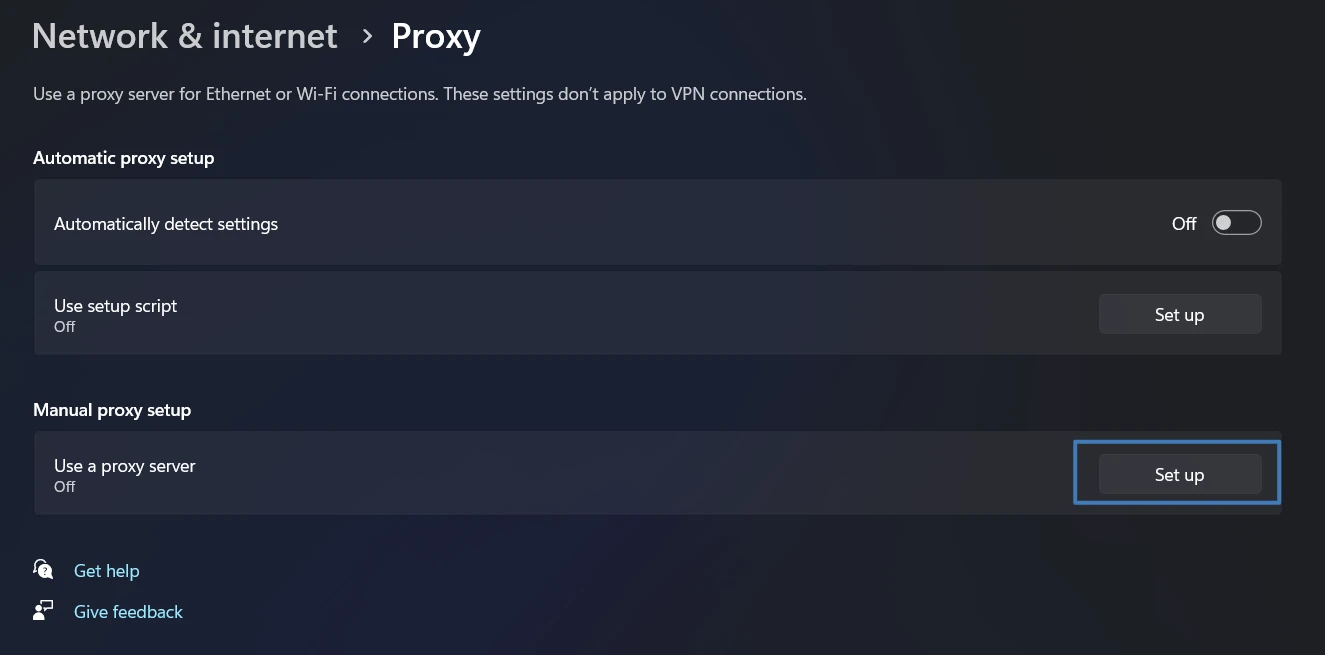
In the “Edit proxy server” window:
- Enable “Use a proxy server.”
- Enter the proxy IP address and port.
- Add website exclusions if needed.
- Toggle “Don’t use the proxy server for local (intranet) addresses” based on your needs.
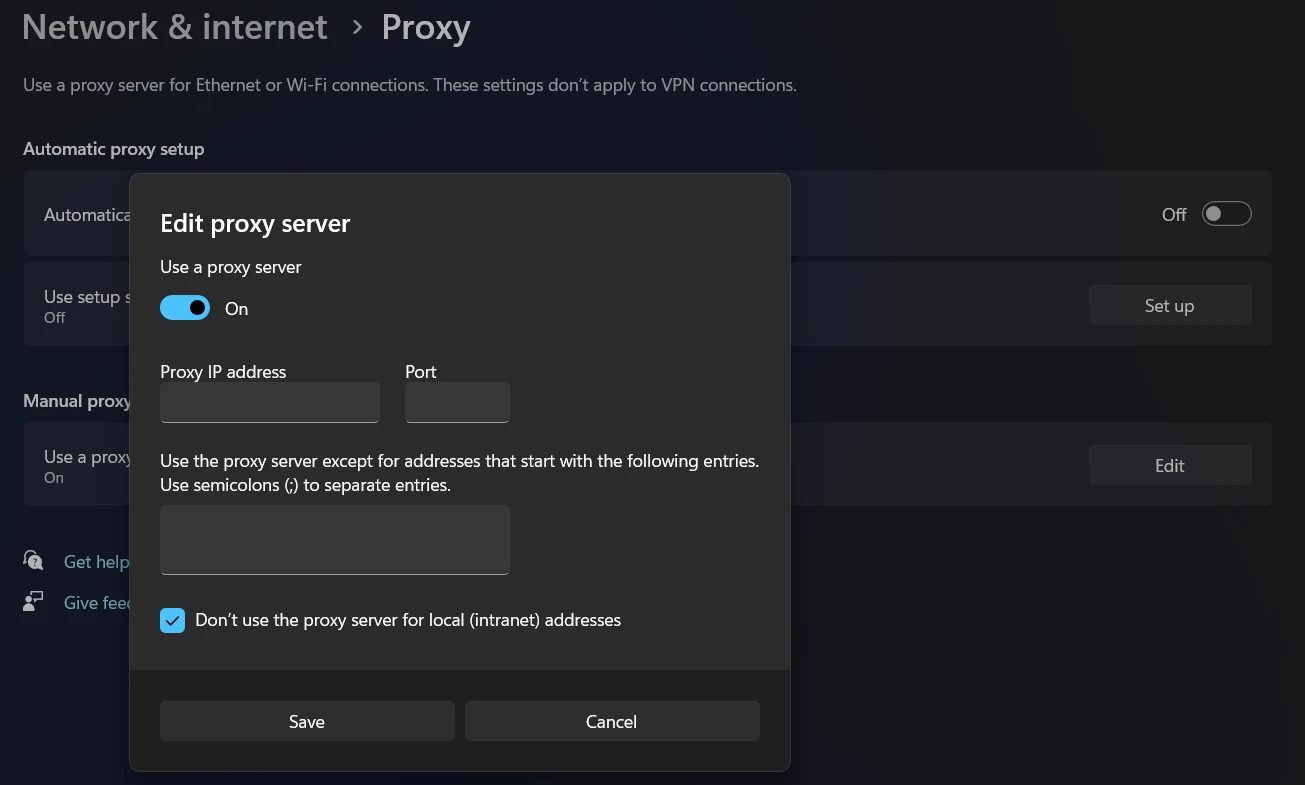
Click “Save” to finish.
macOS
- Open “System Settings.”
- Go to “Network.”
- Select the connection (Wi-Fi or Ethernet).
- Click “Advanced,” then open the “Proxies” tab.
- Enable the desired proxy type and enter the required details.
Potential Issues to Be Aware Of
Gaming with proxies is generally effective, but it’s important to understand possible edge cases. These aren’t deal-breakers—just scenarios to be prepared for. Most are easily resolved with a reliable provider and proper configuration.
- A poorly located proxy can increase latency. With quality gaming proxies, this is uncommon because servers are positioned near game data centers and routes are optimized.
- Not every proxy type works for gaming. HTTP proxies don’t support UDP, which most games require. Reliable gaming proxies always include UDP support.
Even with correct setup, occasional issues may still arise, such as temporary ping spikes or disconnections. Fortunately, most are easy to diagnose and fix.
- High ping after midnight
Cause: overloaded servers during peak nighttime hours.
Fix: switch to a less crowded exit node or enable scheduled auto-switching. - “Proxy detected” error during login
Cause: the IP address is flagged or banned.
Fix: rotate the IP, change servers, clear cookies/cache, and avoid repeated login attempts. - Packet loss every 60 seconds
Cause: Wi-Fi interference from household devices.
Fix: switch to 5 GHz, use Ethernet, or select a less congested Wi-Fi channel (40+ on 5 GHz). - Disconnects during map loading
Cause: IP change mid-session or tunnel drop.
Fix: enable fixed-session mode or set session duration to 2–3 hours. - Launcher update errors
Cause: proxy protocol doesn’t handle large downloads well.
Fix: temporarily switch protocols (e.g., HTTPS ↔ SOCKS5) or disable the proxy during updates. - Console cannot connect through proxy
Cause: incorrect port or unsupported authentication.
Fix: verify port settings, adjust authentication options, and request console-specific setup instructions. - Fast battery drain on mobile devices
Cause: high CPU usage from encryption.
Fix: lower encryption strength, use a lighter protocol, or switch to low-overhead modes on trusted networks.
How to Select the Best Proxy for Gaming
- RTT to the proxy. Time from your device to the proxy server. Aim for under 30 ms.
- RTT from proxy to game server. The combined device→proxy→server latency should be as low as possible.
- Jitter. Ideally below 4 ms for smooth real-time gameplay.
- Packet loss. For long sessions, anything under 0.2% is acceptable.
- Protocol and UDP support. Mandatory for most modern games.
- IP rotation speed. Fast switching (<20 seconds) is crucial in case of bans or connection issues.
- Dashboard and API stability. Reliable control panels and APIs allow quick exit-node changes during gameplay.
When choosing gaming proxies, consider Belurk. Belurk provides high-performance proxies with optimized routes to gaming data centers, full UDP support, DDoS mitigation, an intuitive dashboard, and rapid IP switching via interface or API.
Belurk is a dependable solution for gamers. Our proxies won’t fail you mid-match. With Belurk, you focus on gameplay—not connectivity. Enjoy smoother matches, fewer lags, reduced packet loss, strong protection, and hassle-free setup.