
A store owner counts 100 orders in Shopify for the week. Meta Ads Manager shows 70 purchases. Google Ads shows 60. The missing sales were real, but the browser pixel never saw them, because of blockers, closed tabs or a payment page on another domain. The ad platforms then bid on the 70 they saw, not the 100 you made.
Here is how to send those conversions from your server and CRM to Meta and Google Ads, and how to check that each one counts once.
Key takeaways
- Meta needs event_name, event_time, action_source and user_data on every server event. Website events also need event_source_url and client_user_agent.
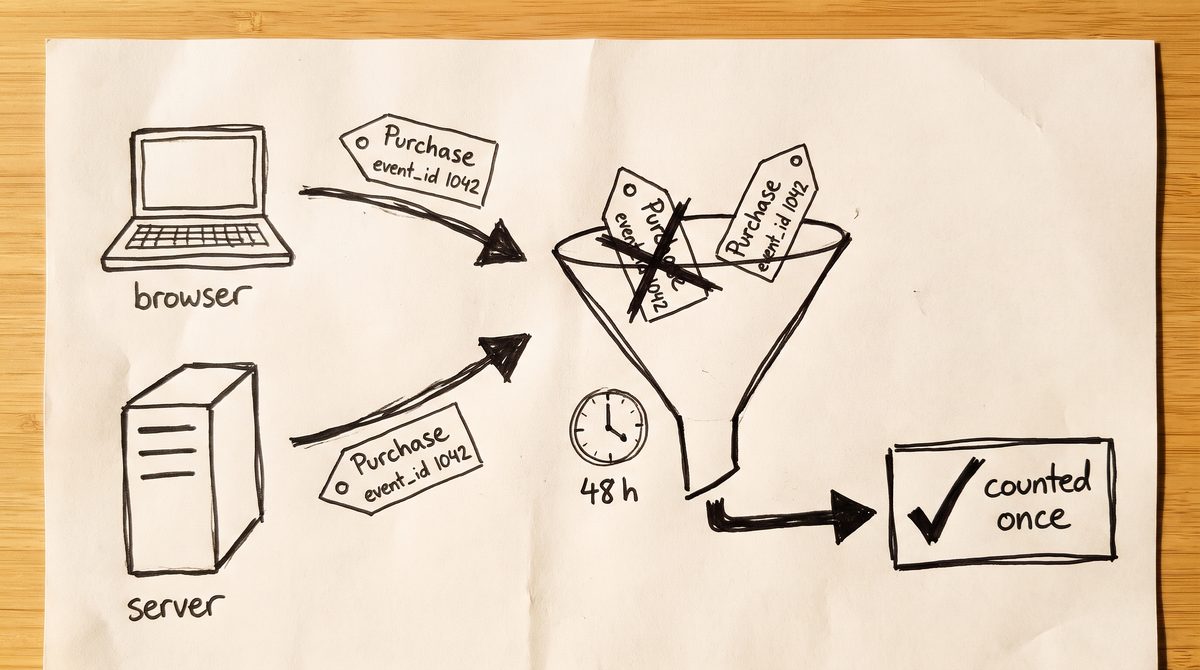
- Meta drops a duplicate when the pixel and the server send the same event_name and event_id within 48 hours.
- Email and phone are hashed with SHA256 after you clean them up. fbp, fbc, IP address and user agent are never hashed.
- Google Ads imports a GCLID conversion only up to 90 days after the click.
- Only Primary conversion actions feed Google Ads bidding.
What is the Meta Conversions API?
The Meta Conversions API is a way to send conversions from your server or CRM straight to Meta, instead of only from the visitor’s browser. It catches sales the pixel misses and sales that close later by phone or email. Google Ads does the same job with enhanced conversions and offline conversion import.
The two platforms ask for different things.
| Check | Meta | Google Ads |
|---|---|---|
| What you send | Server events with event_name, event_time, action_source, user_data | Hashed email from the tag, or GCLID with conversion name and time |
| How it is matched | Hashed email and phone, fbp, fbc, IP, user agent | GCLID, or hashed email matched to signed in Google accounts |
| Duplicates | Same event_name and event_id within 48 hours | Same GCLID, conversion name and time, or Order ID |
| Time limit | event_time up to 7 days old | 90 days after the click for GCLID uploads |
| How to test | Test events tool with test_event_code | Upload Preview and the Diagnostics tab |
How to set up the Conversions API in Meta
There are three routes. A partner integration is the quickest: Shopify and similar platforms send server events once your store is connected to Meta. The Conversions API Gateway runs in your own AWS or Google Cloud account, and Meta’s developer docs say it needs no coding. A direct integration is code your team writes, and it is the route for CRM sales that close days later. Many stores use a partner app first, then add server side tracking for ecommerce stores once refunds, subscriptions or phone orders enter the picture.
For a direct setup, open Events Manager, pick your pixel, open Settings, and click Generate access token under Set up manually.
Meta for Developers lists event_name, event_time, action_source and user_data as required. event_time is a Unix timestamp in seconds, up to 7 days old. action_source says where the sale happened, such as website, phone_call or physical_store. For website events, event_source_url and client_user_agent are required too. Add the real client IP and the fbp and fbc cookies when you have them.
Trim the email and make it lower case. Strip symbols and leading zeros from the phone and keep the country code, so (650) 555 1212 becomes 16505551212. Then hash both with SHA256. Do not hash fbp, fbc, the IP address or the user agent.
Say the pixel fires a Purchase and your server sends the same Purchase. Meta’s deduplication guide matches them by event_name and event_id, so give both the order number as the event_id. Meta keeps one if both arrive within 48 hours. Different IDs mean the sale counts twice.
The Google Ads side: enhanced conversions and offline import
Enhanced conversions for web adds hashed customer data, such as the email from checkout, to your existing Google tag. Turn it on in Goals, then Settings, under Enhanced conversions, and choose the Google tag, Google Tag Manager or the API as the source.
For leads that close later, you have two options. Enhanced conversions for leads matches the hashed email from your form to the one you upload when the deal closes. Offline conversion import matches on the GCLID, so save it in a hidden form field on every lead. Each upload row needs Google Click ID, Conversion Name spelled exactly as in Google Ads, and Conversion Time with a time zone. Add value, currency and Order ID too. To automate both, a marketing attribution platform that sends CRM conversions to Meta and Google can push each closed deal with its real value.
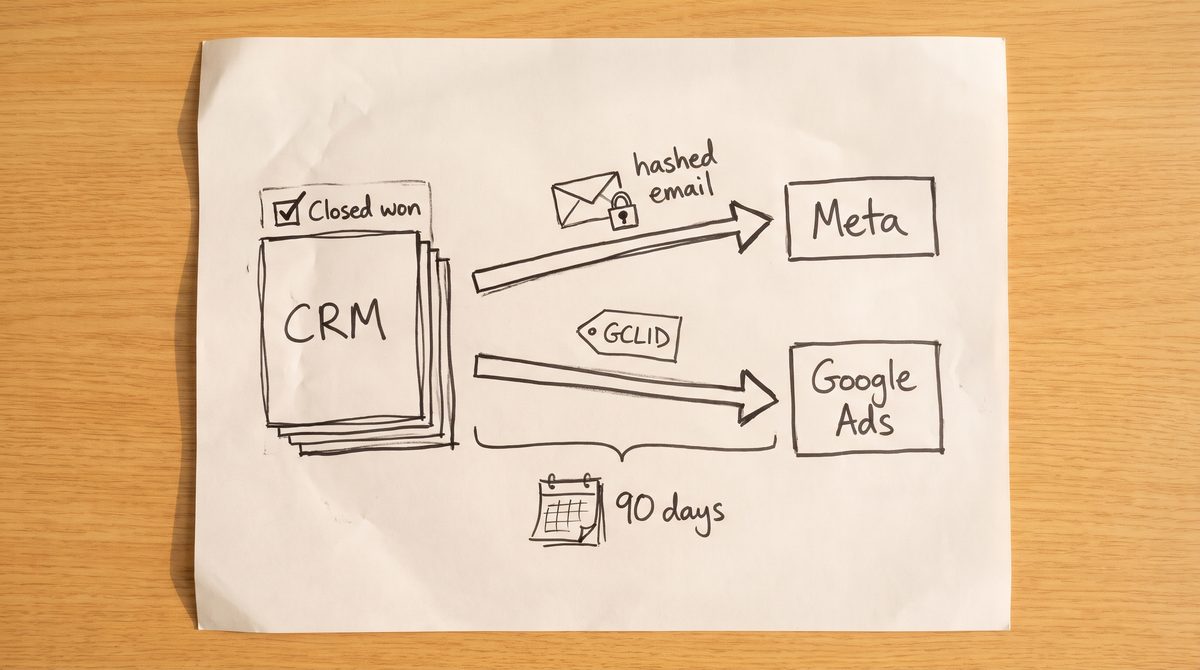
Google Ads Help says a GCLID conversion can be uploaded up to 90 days after the click, and a new conversion action needs 4 to 6 hours before its first upload. For longer sales cycles, also send an earlier stage. Google Ads Help also says offline imports and enhanced conversions for leads uploads move to the Data Manager API from 15 June 2026, so start new builds there.
Only Primary actions feed bidding. Secondary actions are only reported. Make the sale or qualified lead Primary, use Count: Every for purchases and Count: One for leads.
How to set up and test both in one afternoon
1. Build in retries first
If a send fails, retry with the same event_id or Order ID, so a second attempt cannot double count. ObserviX is one example of a service that sends these uploads for you and keeps a record of what each platform received.
2. Send a test event to Meta
Start with Purchase. Copy the code from the Test events tab in Events Manager, send it as test_event_code, and remove it before you go live.
3. Check for duplicates
Buy from your own store once. Meta should show one Purchase from both browser and server, not two.
4. Preview a Google upload
In Goals, then Conversions, then Uploads, choose Preview instead of Apply and fix every error.
5. Watch the scores for a week
In Meta, check Event Match Quality, a score out of 10. In Google Ads, open the Diagnostics tab under Goals, then Summary.
Common questions
Do I still need the Meta pixel with the Conversions API?
Yes. Meta’s best practices assume both, deduplicated by event_id. The pixel adds browser signals, and the server fills the gaps.
Does the Conversions API need a developer?
Not for a partner integration or the Gateway. Sending CRM sales from a direct integration does need someone who can write and maintain code.
Is server side tracking allowed under GDPR?
Hashing is not consent. If you sell in the EU, send events only for people who agreed, as your consent banner records it.
Which hash do Meta and Google use?
SHA256. Clean the data first, because “Jane@Shop.com ” and “jane@shop.com” hash differently.
This week, compare last week’s orders in your store or CRM with the purchases in Meta and Google Ads. The gap is what each platform is not learning from.