
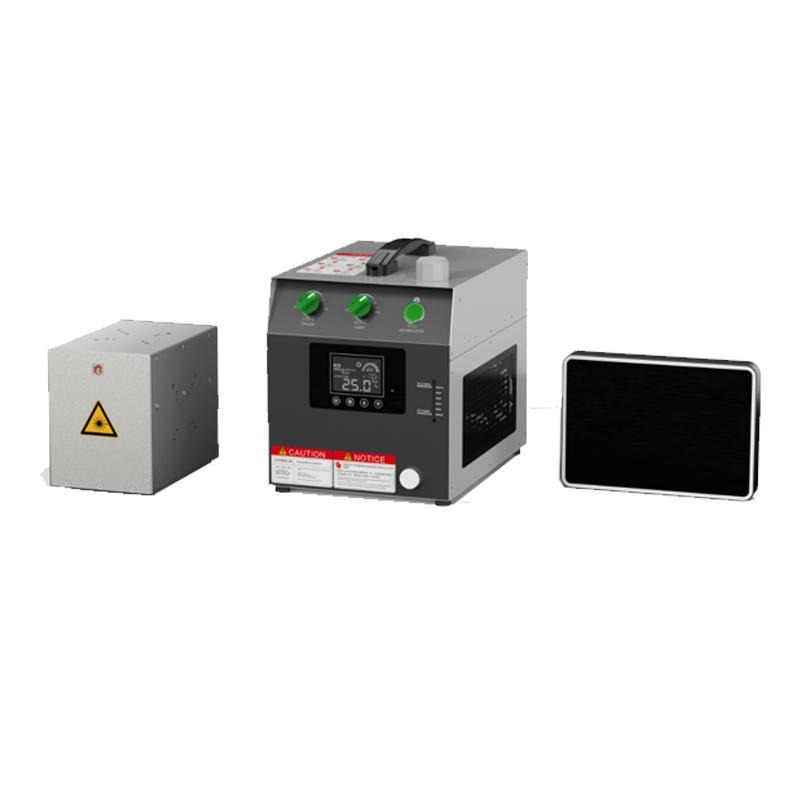
If you need to mark logos, serial numbers, or barcodes onto products, you have probably compared inkjet, engraving, and laser options. A UV laser printer stands out for one reason: it marks almost anything without heat damage, chemicals, or consumables — and the marks last as long as the product.
This guide explains what these machines do, which materials they handle, and how to choose one that fits your workshop and your workload.
What makes UV different
Most lasers mark by heat: they burn, melt, or vaporise the surface. Ultraviolet lasers work differently. Their short wavelength carries high photon energy, which breaks molecular bonds directly in a process called cold marking. The surface barely heats up, so delicate materials do not warp, discolour, or crack.
That cold process is why a UV laser printer handles materials other lasers struggle with: plastics that melt under fibre lasers, glass that cracks under heat, and coated surfaces that would burn. It also produces extremely fine marks — text, QR codes, and intricate logos at resolutions that stay legible at tiny sizes.
Materials and applications
Plastics are the biggest win. ABS, PVC, polycarbonate, and acrylic all mark cleanly with high contrast and no melting at the edges. Glass and ceramics mark well too, from bottles and awards to electronic components, without the micro-cracking that heat-based marking can cause.
Metals can be marked, though fibre lasers are usually faster and cheaper for bare metal. Where UV earns its place on metal is on coated, anodised, or painted surfaces, and on small precision parts where heat distortion is unacceptable. Electronics, medical devices, jewellery, and packaging are the typical industries — anywhere a permanent, precise, heat-free mark matters.
Common jobs include serial numbers and batch codes for traceability, logos on promotional products, barcodes and QR codes on packaging, and fine engraving on awards and gifts. If your work involves heat-sensitive materials or tiny detail, UV is usually the right call.
Power, speed, and working area
UV machines are typically sold in 3W, 5W, 10W, and 15W classes. Lower power suits fine marking on plastics and small items; higher power marks faster and handles tougher jobs, but costs more and needs more cooling. For most small workshops, 5W covers a wide range of work without overspending.
Marking speed depends on the design as much as the power: simple text flies, dense graphics take longer. A rotary attachment is worth considering if you mark cylindrical items like bottles or pens — it turns the piece as the laser works, keeping the mark even. The working area matters too: a larger field marks bigger items in one pass, while a smaller field suits jewellery and electronics.
Choosing for your workshop
Start with your materials list and your most common job, then match the machine to that — not to a hypothetical future job. Check the software: it should import common file formats, handle serialisation and barcodes, and be something your team can learn in a day, not a month.
Safety and support matter as much as specs. UV lasers need proper enclosures and eye protection, and a supplier who answers the phone when something goes wrong is worth more than a slightly lower price. Ask about warranty, spare parts, and training before you buy, and if possible, test the machine on your actual materials first.
To compare models and power classes in one place, browsing a dedicated UV Laser Printer range is a practical next step — you can see which configurations match your materials and budget before talking to a supplier.
Running costs and maintenance
One of the attractions of UV marking is how little it costs to run. There are no inks, no solvents, and no consumable print heads to replace. Electricity and the occasional lens cleaning are the main ongoing costs, which makes per-part costs very low even at modest volumes.
Maintenance is mostly cleaning: keep the lens free of dust and debris, check the cooling system, and keep the work area ventilated. A dirty lens scatters the beam and weakens marks, so a quick wipe with the proper cloth is the highest-value habit you can build.
Plan for the long term too. Diode-pumped UV sources last many thousands of hours, but they do age; budget for eventual replacement and keep a relationship with a supplier who stocks parts. A machine that is easy to service stays profitable far longer than one that is not.
Train more than one person to run the machine. If only one operator knows the software and the safety routine, holidays and sick days stop production — and a second trained operator costs nothing until you need them.
A UV laser printer is the right tool when heat is the enemy and precision is the job. Match the power to your materials, check the software and support, and test on your own products — and you will have a marking setup that pays for itself in clean, permanent, professional results.